Quality is the ally of schedule and cost, not their adversary. — James A. Ward
This article explains what test automation is for, when it helps, and how to think about it so you can make good decisions and avoid common pitfalls. Understanding the trade-offs helps you choose what to automate and how much to invest in maintenance.
What you gain
- Capacity for exploratory testing — By automating predictable checks, testers free time for exploratory testing, edge cases, and usability, where human judgment matters most.
- Consistency — Scripts do the same steps every time; no skipped steps or fatigue.
- Documentation that runs — Well-named tests describe expected behavior.
- Faster execution of repetitive checks — The same scenarios can run in minutes instead of hours, with many inputs and configurations, so you catch regressions earlier.
What automation does not do
- Replace testers — Automation verifies what you programmed it to verify. It does not discover new risks, judge UX, or question requirements.
- Guarantee quality — More tests do not equal better quality. Poorly designed or flaky tests waste time and erode trust in the suite.
- Make sense everywhere — Some scenarios are slow, brittle, or rarely change. Automating them can cost more than running them manually. Good automation is selective.
Principles that actually help
These principles are less about “best practices” and more about designing for change and clarity.
Tests should be easy to read and change
- Readability — Someone unfamiliar with the test should understand what is being verified and why from the test name and structure. Prefer clear names and a small number of focused assertions over one test that checks everything.
- Stability — Prefer stable identifiers and explicit waits over brittle, implementation-dependent selectors. Flaky tests are worse than no tests: they get ignored or disabled and hide real failures.
- Maintainability — UI and product flows change. Isolate locators and page structure (e.g. Page Object Model) so that a single product change doesn’t force you to touch dozens of tests.
Tests should be trustworthy and purposeful
- One logical concern per test — When a test fails, you should be able to infer what broke without digging through many steps. Split long flows into smaller, focused tests where it makes sense.
- Assert the right thing — Verify outcomes that matter to the user or the contract (e.g. API response), not implementation details. Avoid asserting on things that change for unrelated reasons (e.g. internal IDs, timestamps) unless that is the point of the test.
- Independent execution — Tests should not depend on each other or on a specific run order. That allows parallel execution and prevents cascading failures. When full independence is expensive (e.g. some mobile flows), document the trade-off and keep the number of dependent tests small.
These ideas apply across UI, API, and unit tests; the same mindset makes automation easier to maintain and more useful over time.
What to test: the test pyramid
Automation is usually spread across several levels, often pictured as a test pyramid: many fast unit tests at the base; fewer integration/API tests in the middle; and fewer, slower UI tests at the top.
Read Martin Fowler’s Practical Test Pyramid for a solid grounding.
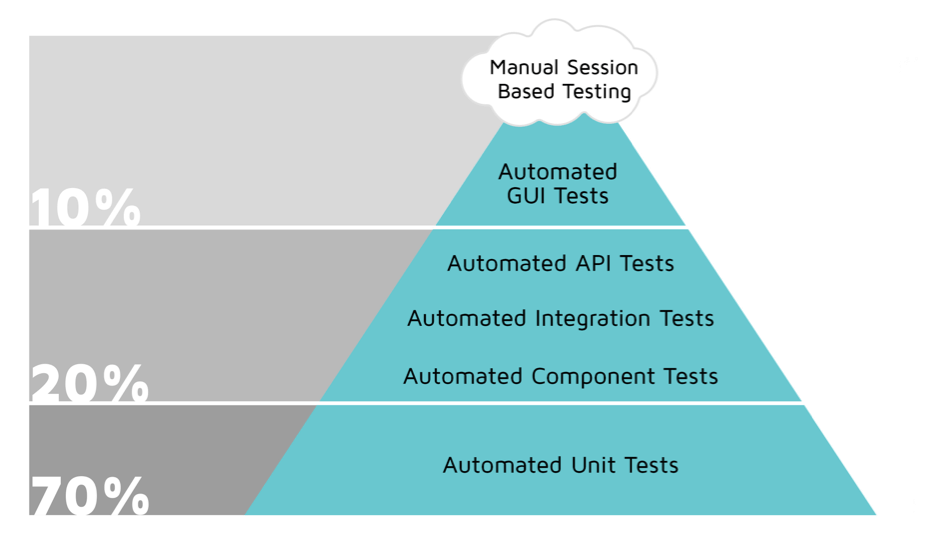
The pyramid is a heuristic, not a rule. It reminds you that:
- Fast, focused tests (unit and API) give quick feedback and are easier to maintain. Use them for business logic, contracts, and integration points.
- UI tests are slow, brittle, and expensive to maintain. Use them for critical user journeys and smoke checks, not for every edge case.
Unit tests
- What — Small tests for functions, classes, or modules in isolation (often with mocks/stubs).
- Who — Usually written and owned by developers, since they require codebase knowledge.
- Why — Fast feedback, high coverage of logic, and they document and protect behavior at the lowest level. Aim for a strong base of unit tests so that many bugs never reach the UI.
API / integration tests
- What — Tests that call APIs (HTTP, gRPC, etc.) and assert on responses, status codes, and payloads. No browser or app UI.
- Why — They are much faster and more stable than UI tests and exercise the integration layer where many bugs appear. They are ideal for contract and business-rule validation.
- How — Start with a tool like Postman; add scripts or CI runs for regression. Check status codes, response body, and headers — not only “200 OK.” See API - Basics and the API section in Tools in test automation.
UI tests
- What — Scripts that drive the application through its UI (web or mobile) as a user would.
- Why — To verify critical end-to-end flows and that the UI and backend work together. They catch integration and navigation issues that unit and API tests can miss.
- Trade-off — They are the slowest and most fragile. Use them sparingly: smoke/sanity and a limited set of high-value user journeys. Prefer coding tests in a framework over long-term reliance on record-and-playback for maintainability.
When choosing what to automate at the UI layer, focus on regression and smoke first; then add scenarios that would be painful or risky to run manually. Avoid automating everything “because we can.”
Deciding what to automate
More automation is not always better. Poor or unnecessary automation wastes time and creates false confidence.
Automate when it pays off
- Regression and smoke — Flows that must work on every release and are run often.
- Repetitive, multi-variant checks — Same flow with many inputs, roles, or environments.
- Critical paths — Login, checkout, core configuration, or anything that would be embarrassing or costly to break in production.
Think twice or avoid when
- The scenario changes often — You will spend more time fixing tests than gaining value.
- Setup or teardown is very heavy — e.g. complex data or many dependent steps. Consider API or unit tests instead, or a smaller slice of the flow.
- The behavior is hard to assert reliably — e.g. timing-dependent or visual. These often become flaky; sometimes manual testing is more efficient.
- It’s a one-off or rare case — Automation may never pay back the initial and maintenance cost.
Questions to ask
- What do we get from this test? (e.g. faster regression, confidence in a specific risk?)
- How often will we run it, and how often will the product change in ways that break it?
- Can we cover the same risk with a faster, more stable test (e.g. API instead of UI)?
If a test is flaky and you repeatedly “fix” it without addressing the root cause, consider removing it or converting it to a manual check. Flaky tests drain trust and time. See the section on flaky tests in Test automation conventions.
Summary
- Automation is an investment — It should save time and increase confidence, not just increase test count.
- Design for readability and change — Clear names, good structure (e.g. POM), stable selectors, and meaningful assertions.
- Follow the pyramid — Prefer many fast unit and API tests; use UI tests for a small set of critical flows.
- Be selective — Automate what gives clear value; avoid or remove tests that are flaky, redundant, or too expensive to maintain.
For concrete tooling and patterns, see Tools in test automation and Test automation conventions.