Presenting is hard and doesn’t come naturally to everyone. But it is an important skill for designers because it helps us connect emotionally with our audience.
Effectively presenting design work means three things: understanding the idea, advocating for the solution, and gathering the right feedback. Being able to do all three is a core design skill, and, like any skill, it improves with practice.
When you are presenting, take your ego out of the game and be receptive to feedback. Gathering and using constructive feedback is essential for refining and improving the design. Treat every presentation as storytelling, and always be aware of your audience. Presenting to a client is different from presenting to the design or engineering team, so adjust your vocabulary and focus accordingly.
Know the idea
Before you can advocatea for a solution, you need to understand it.
This means knowing the goals, strategy, constraints, user needs, business needs, technical limitations, and design requirements. Presenting is about the idea. It's not about you or your design abilities. It's about taking the ideas from your head and showing the client how your solution solves the problem.
Since you are presenting ideas, they should always be supported by research. So take notes along the way as you do research. Save articles or examples that back up your design decisions, because you'll want references when someone pushes back.
On the more creative parts of the work, be prepared to be flexible and let go. Those decisions are less rooted in hard data, which makes them easier to question. Think of your presentation as an extension of your research, not a showcase of your craft.
Prepare: what to use?
The right format depends on what you're presenting and who you're presenting to. Here's a quick breakdown:
- Pitch: best for internal presentations and any situation where a lot of collaboration is needed to get the content right, but misses some advanced editing features
- Keynote: the go-to for highly polished, client-facing work (proposals, sales decks, and concept presentations where visual quality matters), file sizes can grow large, and collaboration can be tricky
- Figma prototype: the best choice when presenting new features or improvements on an existing project. Clients are much better at understanding flow and interaction when they can see it in motion rather than as static screens.
- Figma canvas walkthrough: a good option for simpler flows that don't need a full prototype. Just walk through the frames directly in Figma.
Advocating for the solution
This is the part where you present you design.
Setting up the call
The first thing you do in any presentation is tell the client exactly what you're covering today and what you're not through an outline. An example of that would be:
"Today we're going to look at how we've applied the brand to the landing page and walk through the primary CTAs. We're not covering [other feature] today."
This frames the session, keeps things focused, and prevents the conversation from going down a rabbit hole. Once you've set the scope, guide your stakeholders on what you need from them: "We want to know if we've treated the brand correctly and if it's meeting your expectations." When you give your team a specific focus, they'll give you more useful feedback. Remind the client that you welcome any and all honest feedback.
Nerves
A lot of designers feel nervous before presentations, and that's completely normal. The only way to get better is to keep presenting and utilizing these tactics.
The most effective technique is to take the focus off yourself and make it about the ideas. It's about the research, not about you. The moment you shift that mental frame, the pressure drops.
What to say
Don't walk down the page pointing out what the client can already see. Get out of the pattern of narrating building blocks ("Here's the header, here's the button…") and turn the presentation into a story about their goals, the problem, and the research behind your decisions. Use phrases that anchor decisions in evidence:
- "Our most important goal was..."
- "We heard..."
- "What we've seen on competitor sites..."
- "During research we learned..."
- "Industry patterns suggest..."
- "Based on project constraints..."
- "Best practice solutions tell us..."
Connect everything back to research, goals, and the problem you're solving. That's the story. If there are multiple complex topics to cover, prioritize them and allocate specific times for each.
When things go south
If the client doesn't like something about your design, start with why.
Stay in researcher mode rather than panicking, and guide the conversation toward problem-based rather than solution-based feedback. This keeps you in the decision-making seat.
If they don't like something, ask them to elaborate: "Tell me a little bit more about that." If they give you something solution-based like "make the image bigger," dig into the root: "Do you feel there's too much white space?"
When you understand the problem, you keep the focus on the strategy. That’s the best way to maintain creative ownership and stay proactive rather than reactive.
Gather feedback
It's okay not to have answers on the call. You don't have to decide anything on the spot. A perfectly good response is: "I love the feedback. I don't have immediate answers, but I'll take it back to the team, discuss it, and get back to you."
Avoid iterating on your solutions during a call, unless you are explicitly in a workshop. The moment you start sketching out ideas on the spot, you're positioning yourself as an extension of the client rather than the design expert who owns the solution. You run the risk of throwing out ideas that aren’t part of the strategy, haven’t been vetted, or are too costly. Save those conversations for after the call, when you can think it through properly.
Recap
Close every session with a recap and clear next steps. "We heard great feedback, we have some new goals, and we're going into design revisions." Make sure the client knows whether they need to provide anything to you before the next round.
After the call
If the feedback was significant, go back to the strategy. Revisit the research, reconnect with the client, and find a compromise if needed. Sometimes a focus has shifted, or there's a new user need. Design is a job, and it’s all about meeting the client’s goals and strategy. Breathe, don't take it too seriously, and don't put unnecessary pressure on yourself.
Sometimes, even after your best efforts and clearly articulated design decisions, the client wants to go in a different direction. That’s also okay. Know when to push on an idea and when to let it go. You’ve laid out the pros and cons, and in the end, it’s their decision.
Don't make it about yourself, and that will go a long way in giving you the confidence and space to make changes.
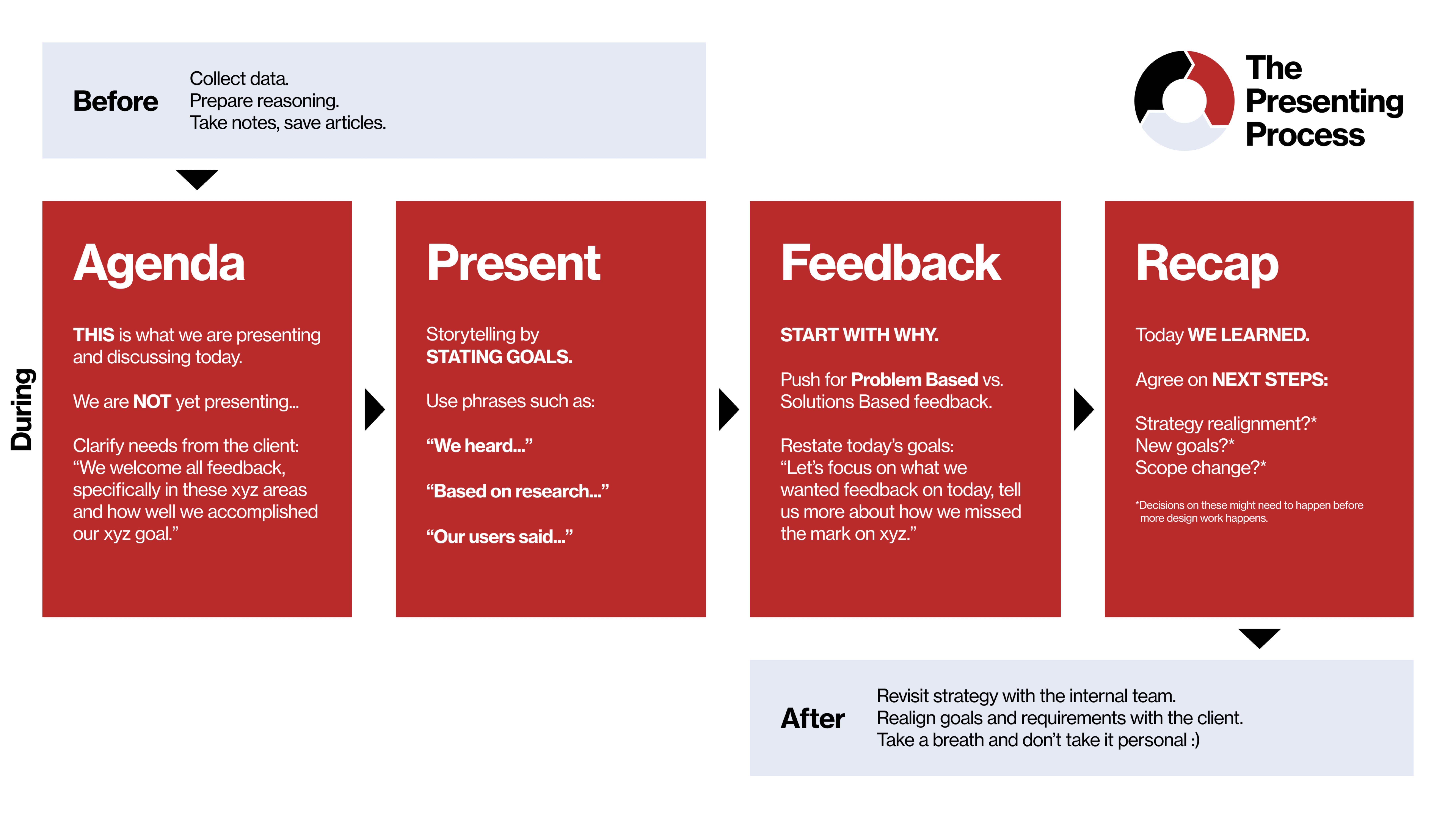
The Presenting Process
By following this guide, you'll be set for your next presentation!
Tips
- Prepare your Figma file: close unnecessary pages, set the right starting frame, make sure prototype flows actually work before the call
- Use realistic content: no lorem ipsum, no "test test test", real-looking data makes your designs easier to evaluate
- Silence notifications: snooze laptop notifications, put your phone on mute, close unrelated tabs
- Do a dry run: run through the presentation with a colleague beforehand, they'll spot things you've overlooked
- Know your audience: presenting to a client is not the same as presenting to the dev team or the design team, so always adjust your vocabulary and focus
- Don't read off a script: bullet points are fine, you should know your material well enough to talk through it naturally
- Explain the why: when walking through a flow, always explain the reasoning behind decisions, not just what's on the screen
- Don't rush: screen sharing lags, so slow down your clicks, your scrolling, and your speech
- Don't take feedback personally: feedback is about the work and the decisions, not about you or your abilities as a designer